# Frequently Asked Questions
#### Does FGC.Network use Mastodon?
FGC.Network is powered by Pleroma, which is a microblogging service based on the ActivityPub protocol.
Using ActivityPub, FGC.Network can communicate with many other services including Mastodon and Pixelfed. This collective of "instances" that host these services is called "federated social networks" and abbreviated as the **fediverse**.
Using Federation, FGC.Network enables you to find, follow and interact with your friends no matter where they choose to sign up for an account.
#### I'm using the Mastodon app, and I'm having issues.
The Mastodon official app is notoriously buggy even on official deployments. Add the site directly to your home screen from your browser to enjoy a native posting experience on mobile!
#### Why can't I see the follow button when logged in?
Some adblockers or script blockers will prevent you from being able to follow other users. Please add an exception for FGC.Network, we do not serve ads or tracking scripts.
#### What is the maximum file size allowed as an attachment?
Our current file upload limit is 50MB per attachment.
# Donations
We accept donations through the following channels:
* [Subscription (recurring) donation via Patreon.](https://patreon.com/fgcnetwork)
* [One-time donation via Ko-Fi.](https://ko-fi.com/fgcnetwork)
No other channels or links are used to receive donations.
# Terms of Service
By signing up for an account at FGC.Network, you agree to the following policies:
* [Code of Conduct](/policy/conduct)
* [Fighting Game Code of Conduct](https://fgcoc.com/)
* [Privacy Policy](/policy/privacy)
* [Federation Policy](/policy/federation)
In addition, we reserve our right to take action on your content as required by the following platforms we rely on:
* [Wasabi Platform Service Terms](https://wasabi.com/legal/storage-platform/)
* [Digital Ocean Terms of Service Agreement](https://www.digitalocean.com/legal/terms-of-service-agreement)
* [Fastmail Terms of Service](https://www.fastmail.com/about/tos/)
FGC.Network staff reserve final decision on any matter not outlined by the above documents. Our Terms of Service and related documents may be updated at any time.
# Code of Conduct
### Code of Conduct
First and foremost, FGC.Network is a general-use social network run by the community, for the community. With that said, our number one goal is to provide a Safe and Enjoyable experience for all users. To support such a space, we have a zero tolerance policy towards the propagation or endorsement of hate speech, harassment or other antagonistic speech/actions.
In line with these values, FGC.Network adopts the [Fighting Game Code of Conduct](https://www.google.com/url?q=https://fgcoc.com\&sa=D\&source=editors\&ust=1668472533483331\&usg=AOvVaw3GNuBAhIUONKAE_eH6pWzp). The guidelines outlined in the FGCoC serve as a base for our own Code of Conduct, which we detail below.
Any activity that degrades on the basis of race, ethnicity, gender, sexuality, religion, age, disability, or any other similar ground is considered hateful speech and will not be tolerated. This includes (but is not limited to), content that is unlawful, libelous, defamatory, obscene, harassing, threatening, invasive of privacy or publicity rights, abusive, inflammatory, fraudulent or otherwise objectionable.
This policy extends to forums, text chat, voice chat, social media, user IDs & anywhere else where FGC.Network users congregate. All users and staff, are expected to follow this Code of Conduct, and are empowered to report any violations in the name of a Safe and Enjoyable community.
### User-uploaded Content & Media
As a general rule, EXIF data and filenames are scrubbed when uploaded to the service.
The following content will be **removed without warning and may lead to account suspension:**
* Excessive gore.
* Exploitation or abuse of persons under 18 years of age.
* Glorification or threats of violence and harassment.
* Promotion or advertisement of any kind related to cryptocurrencies or multi-level marketing / Ponzi schemes.
* Media or text content that encourages or allows software piracy.
* Copyrighted content that has not been authorized to be uploaded by the user to FGC.Network.
* Content considered illegal to host by our platform providers.
The following content requires the use of the "Sensitive Content" (also known as Content Warning) feature in **Public** posts:
* Nudity or sexual acts.
Unlisted, Mention-only or Private posts do not require content warnings.
### Advertising & self-promotion
Advertisements should not be excessive or automated. If you are a business planning to run a recurring advertisement campaign from your fgc.network account, please provide written notice to and expect a reply before proceeding.
### Bots
Bot accounts are equally observed under the FGC.Network Terms of Service. Bot accounts must be explicitly marked in the user settings available on the site.
### Data Access
Content hosted by FGC.Network must not be used for the purposes of machine learning or other "research" purposes without the explicit consent of the users involved.
Content on this instance beyond this page must not be archived or indexed wholesale by automated means by any user or service. Active users may export their following lists and posts through the export provided on their settings page, or the API.
### Reporting
While we encourage people to resolve conflicts among themselves, If the need arises for the reporting of someone’s misbehavior and it would require detailed review in privacy, [please use the Report function available while logged in to FGC.Network.](/usage/reporting-users)
Our zero tolerance policy means that we will look into and review every allegation of violation of our Code of Conduct and respond appropriately. Please note, while we take all concerns raised seriously, we will use our discretion as to determining when and how to follow up on reported incidents, and may decline to take any further action and/or may direct the participant to other resources for resolution.
### Repercussions
Users who fail to comply with our Terms of Service will be subject to consequences as decided by FGC.Network staff. This includes, but is not limited to, written warnings, Public Timeline delisting, Federation limitations and account suspensions of either temporary or permanent nature. In addition, reports of misconduct will be made to the appropriate organizations as necessary.
### Copyright Enforcement
Copyrighted content may be removed at any time upon request by the copyright holder and subsequent verification by our staff.
# Privacy Policy
At FGC.Network, accessible from , one of our main priorities is the privacy of our visitors. This Privacy Policy document contains types of information that is collected and recorded by FGC.Network and how we use it.
If you have additional questions or require more information about our Privacy Policy, do not hesitate to contact us.
This Privacy Policy applies only to our online activities and is valid for visitors to our website with regards to the information that they shared and/or collect in FGC.Network. This policy is not applicable to any information collected offline or via channels other than this website.
### Consent
By using our website, you hereby consent to our Privacy Policy and agree to its terms.
### Information we collect
The personal information that you are asked to provide, and the reasons why you are asked to provide it, will be made clear to you at the point we ask you to provide your personal information.
If you contact us directly, we may receive additional information about you such as your name, email address, phone number, the contents of the message and/or attachments you may send us, and any other information you may choose to provide.
When you register for an Account, we may ask for your contact information, including items such as a display name, email address, and a user-defined password.
No services provided by FGC.Network provide end-to-end secure communications. Moderation staff reserves the right to review and communications made through our service to issue repercussions based on user reports.
### How we use your information
Any of the information we collect from you may be used in the following ways:
* To provide the core functionality of Pleroma. You can only interact with other people's content and post your own content when you are logged in. For example, you may follow other people to view their combined posts in your own personalized home timeline.
* To aid moderation of the community – when a status or account is reported, we will look into the matter as part of our moderation tasks.
* The email address you provide may be used to send you information, notifications about other people interacting with your content or sending you messages, and to respond to inquiries, and/or other requests or questions.
### Information protection
We implement a variety of security measures to maintain the safety of your personal information when you enter, submit, or access your personal information. Among other things, your browser session, as well as the traffic between your applications and the API, are secured with HTTPS, and your password is hashed using a strong one-way algorithm. You may enable two-factor authentication to further secure access to your account.
### Log Files
FGC.Network follows a standard procedure of using log files. These files log visitors when they visit websites. All hosting companies do this and a part of hosting services' analytics. The information collected by log files include internet protocol (IP) addresses, browser type, Internet Service Provider (ISP), date and time stamp, referring/exit pages, and possibly the number of clicks. These are not linked to any information that is personally identifiable. The purpose of the information is for analyzing trends, administering the site, tracking users' movement on the website, and gathering demographic information.
### Cookies
Like any other website, FGC.Network uses 'cookies'. These cookies are used to store information including user login status and user-defined preferences.
### Third Party Privacy Policies
FGC.Network's Privacy Policy does not apply to other websites that you may interact with through the service. Thus, we are advising you to consult the respective Privacy Policies of these third-party ad servers for more detailed information. It may include their practices and instructions about how to opt-out of certain options.
You can choose to disable cookies through your individual browser options. To know more detailed information about cookie management with specific web browsers, it can be found at the browsers' respective websites.
### CCPA Privacy Rights (Do Not Sell My Personal Information)
Under the CCPA, among other rights, California consumers have the right to:
Request that a business that collects a consumer's personal data disclose the categories and specific pieces of personal data that a business has collected about consumers.
Request that a business delete any personal data about the consumer that a business has collected.
Request that a business that sells a consumer's personal data, not sell the consumer's personal data.
If you make a request, we have one month to respond to you. If you would like to exercise any of these rights, please contact us.
### GDPR Data Protection Rights
We would like to make sure you are fully aware of all of your data protection rights. Every user is entitled to the following:
The right to access – You have the right to request copies of your personal data. We may charge you a small fee for this service.
The right to rectification – You have the right to request that we correct any information you believe is inaccurate. You also have the right to request that we complete the information you believe is incomplete.
The right to erasure – You have the right to request that we erase your personal data, under certain conditions.
The right to restrict processing – You have the right to request that we restrict the processing of your personal data, under certain conditions.
The right to object to processing – You have the right to object to our processing of your personal data, under certain conditions.
The right to data portability – You have the right to request that we transfer the data that we have collected to another organization, or directly to you, under certain conditions.
If you make a request, we have one month to respond to you. If you would like to exercise any of these rights, please contact us.
### Children's Information
Another part of our priority is adding protection for children while using the internet. We encourage parents and guardians to observe, participate in, and/or monitor and guide their online activity.
FGC.Network does not knowingly collect any Personal Identifiable Information from children under the age of 13. If you think that your child provided this kind of information on our website, we strongly encourage you to contact us immediately and we will do our best efforts to promptly remove such information from our records.
# Federation Policy
This page describes the policies related to other federated social network instances that are in effect at FGC.Network. Note that these policies may be updated at any time by our staff.
### Instance Filtering
⛔: This instance cannot be interacted with at all from FGC.Network.
🔇: This instance cannot be seen in the Known Network timeline, but it can be searched for and interacted with from FGC.Network at the discretion of users.
🔞: Any media shared by this instance is marked as sensitive when displayed on FGC.Network.
| Instance | Status¹ |
| --------------------------- | ------- |
| bae.st | ⛔ |
| baraag.net | ⛔ |
| beefyboys.club | ⛔ |
| beta.birdsite.live | ⛔ |
| birb.elfenban.de | ⛔ |
| bird.evilcyberhacker.net | ⛔ |
| bird.froth.zone | ⛔ |
| bird.nzbr.de | ⛔ |
| birdbots.leptonics.com | ⛔ |
| birdsite.b93.dece.space | ⛔ |
| birdsite.link | ⛔ |
| birdsite.monster | ⛔ |
| birdsite.slashdev.space | ⛔ |
| birdsitelive.treffler.cloud | ⛔ |
| birdsite.thorlaksson.com | ⛔ |
| birdsite.wilde.cloud | ⛔ |
| bridge.birb.space | ⛔ |
| brighteon.social | ⛔ |
| cawfee.club | ⛔ |
| chudbuds.lol | ⛔ |
| club.darknight-coffee.eu | ⛔ |
| comfyboy.club | ⛔ |
| daishouri.moe | ⛔ |
| detroitriotcity.com | ⛔ |
| freeatlantis.com | ⛔ |
| freefedifollowers.ga | ⛔ |
| frennet.link | ⛔ |
| freespeechextremist.com | ⛔ |
| f.haeder.net | ⛔ |
| gab.com, gab.ai | ⛔ |
| gameliberty.club | ⛔ |
| gegenstimme.tv | ⛔ |
| gitmo.life | ⛔ |
| glindr.org | ⛔ |
| glowers.club | ⛔ |
| honkwerx.tech | ⛔ |
| iddqd.social | ⛔ |
| itmslaves.com | ⛔ |
| jaeger.website | ⛔ |
| kenfm.quadplay.tv | ⛔ |
| kiwifarms.cc | ⛔ |
| libre.tube | ⛔ |
| lolicon.rocks | ⛔ |
| mastodon.network | ⛔ |
| mastodon.popps.org | ⛔ |
| meta-tube.de | ⛔ |
| midnightride.rs | ⛔ |
| mstdn.foxfam.club | ⛔ |
| nicecrew\.digital | ⛔ |
| ns.auction | ⛔ |
| newjack.city | ⛔ |
| noagendasocial.com | ⛔ |
| ohai.su | ⛔ |
| pawoo.net | 🔇🔞 |
| paypig.org | ⛔ |
| pieville.net | ⛔ |
| play.xmr.101010.pl | ⛔ |
| pleroma.rareome.ga | ⛔ |
| pleroma.kitsunemimi.club | ⛔ |
| pleroma.narrativerry.xyz | ⛔ |
| pleroma.nobodyhasthe.biz | ⛔ |
| pl.natehiggers.online | ⛔ |
| pl.info.natehiggers.online | ⛔ |
| pl.tkammer.de | ⛔ |
| poa.st | ⛔ |
| poster.place | ⛔ |
| ryona.agency | ⛔ |
| shitposter.club | ⛔ |
| sinblr.com | 🔇🔞 |
| skippers-bin.com | ⛔ |
| sneak.berlin | ⛔ |
| social.urspringer.de | ⛔ |
| social.ancreport.com | ⛔ |
| socnet.supes.com | ⛔ |
| solagg.com | ⛔ |
| spinster.xyz | ⛔ |
| tastingtraffic.net | ⛔ |
| toot.canberrasocial.net | ⛔ |
| truthsocial.co.in | ⛔ |
| tube.kenfm.de | ⛔ |
| tube.querdenken-711.de | ⛔ |
| twitter.activitypub.actor | ⛔ |
| twitterbridge.jannis.rocks | ⛔ |
| twtr.plus | ⛔ |
| varishangout.net | ⛔ |
| wiki-tube.de | ⛔ |
| wintermute.fr.to | ⛔ |
| yggdrasil.social | ⛔ |
# Website Interface
**Left column**
* First block: This section is dedicated to posting.
* Second block: Here you can switch between the different views for the right column.
* Third block: This is the Notifications block, here you will get notified whenever somebody mentions you, follows you, repeats or favorites one of your statuses.
#### Right column
This is where the interesting stuff happens! There are different views depending on what you choose in the second block of the left panel.
* **Timelines** Depending on the timeline you will see different statuses, but each status has a standard structure:
* Profile pic, name and link to profile. An optional left-arrow if it's a reply to another status (hovering will reveal the reply-to status). Clicking on the profile pic will uncollapse the user's profile where you can find information about the account and can [follow, mute or block the account](https://docs-develop.pleroma.social/frontend/user_guide/users_follow_mute_block/).
* An arrow icon on the right side allows you to open the status on the instance where it's originating from.
* A `+` button on the rightmost side allows you to Expand/Collapse an entire discussion thread.
* The text of the status, including mentions and attachments. If you click on a mention, it will automatically open the profile page of that person.
* Four buttons (left to right): Reply, Repeat, Favorite and Add Reaction. The three dots next to it are a dropdown menu for extra options including simple moderation, bookmarking, deleting posts, pinning your own posts to your profile and more.
* **Interactions** shows all interactions you've had with people on the network, basically same as notifications except grouped in convenient way.
* **Chats** is the chat feature. You can find your friends and start chatting with them.
* **About** is the about-page and lists the staff, the TOS, activated MRF's, and enabled features
#### Top right
* The magnifier icon opens the search screen
* You can search for statuses, people and hashtags.
* You can import statuses from remote servers by pasting the URL to the post in the search field.
* If you want to search for users that your instance doesn't know about yet, you can search for them using the full `name@instance.tld` handle. You can also use the full URL from their remote profile.
* The gear icon opens the Settings screen.
* The last icon is to log out
# Posting, Reading & Repeating
After registering and logging in you're presented with your timeline in right column and new post form with timeline list and notifications in the left column.
Posts will contain the text you are posting, but some content will be modified:
1. Mentions: Mentions have the form of @user or @. These will become links to the user's profile. In addition, the mentioned user will always get a notification about the post they have been mentioned in, so only mention users that you want to receive this message.
2. URLs: URLs like `http://example.com` will be automatically be turned into a clickable links.
3. Hashtags: Hashtags like #cofe will also be turned into links.
4. There is a default character limit of 5000 characters.
Let's clear up some basic stuff. When you post something it's called a **post** or it could be called a **status** or even a **toot** depending on whom you ask. Post has body/content but it also has some other stuff in it - from attachments, visibility scope, subject line...
**Emoji** are small images embedded in text, there are two major types of emoji: [unicode emoji](https://en.wikipedia.org/wiki/Emoji) and custom emoji. While unicode emoji are universal and standardized, they can appear differently depending on where you are using them or may not appear at all on older systems.
**Attachments** are fairly simple - you can attach any file to a post as long as the file is within maximum size limits. If you're uploading explicit material you can mark all of your attachments as sensitive (or add the `#nsfw` tag) - it will hide the images and videos behind a warning so that it won't be displayed instantly.
**Subject line** also known as **CW** (Content Warning) could be used as a header to the post and/or to warn others about contents of the post having something that might upset somebody or something among those lines. Several applications allow to hide post content leaving only subject line visible. Using a subject line will not mark your images as sensitive, you will have to do that explicitly (see above). **Note:** the Subject line must be enabled in your Settings once logged in, and the contents of your Subject line cannot be found using the search function.
**Visiblity scope** controls who will be able to see your posts. There are four scopes available:
1. `Public`: This is the default, and some fediverse software, like GNU Social, only supports this. This means that your post is accessible by anyone and will be shown in the public timelines.
2. `Unlisted`: This is the same as public, but your post won't appear in the public timelines. The post will still be accessible by anyone who comes across it (for example, by looking at your profile) or by direct linking. They will also appear in public searches.
3. `Followers only`: This will show your post only to your followers. Only they will be able to interact with it. Be careful: When somebody follows you, they will be able to see all your previous `followers only` posts as well! If you want to restrict who can follow you, consider [locking your account down to only approved followers.](/usage/settings#profile)
4. `Direct`: This will only send the message to the people explicitly mentioned in the post.
A few things to consider about the security and usage of these scopes:
* None of these options will change the fact that the messages are all saved in the database unencrypted. They will be visible to your server admin and to any other admin of a server who receives this post. Do not share information that you would consider secret or dangerous. Use encrypted messaging systems for these things.
* Follower-only posts can lead to fragmented conversations. If you post a follower-only post and somebody else replies to it with a follower-only post, only people following both of you will see the whole conversation thread. Everybody else will only see half of it. Keep this in mind and keep conversations public if possible.
* Changing scopes during a thread or adding people to a direct message will not retroactively make them see the whole conversation. If you add someone to a direct message conversation, they will not see the post that happened before they were mentioned.
* **Reply-to** if you are replying to someone, your post will also contain a note that your post is referring to the post you're replying to. Person you're replying to will receive a notification *even* if you remove them from mentioned people. You won't receive notifications when replying to your own posts, but it's useful to reply to your own posts to provide people some context if it's a follow-up to a previous post. There's a small "Reply to ..." label under post author's name which you can hover on to see what post it's referring to.
### Rich text
By default new posts you make are plaintext, meaning you can't make text **bold** or add custom links or make lists or anything like that. However if your instance allows it you can use Markdown or BBCode or HTML to spice up your text, however there are certain limitations to what HTML tags and what features of Markdown you can use.
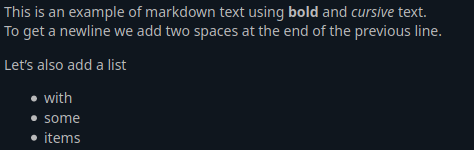
Here is a small example of some text in markdown.
```
This is an example of markdown text using **bold** and *cursive* text.
To get a newline we add two spaces at the end of the previous line.
Let's also add a list
* with
* some
* items
```
If you set the input-method to Markdown, and post this, it will look something like
### Other actions
In addition to posting you can also *favorite* posts also known as *liking* them and *repeat* posts (also known as *retweeting or* *boosting*). Favoriting a post increments a counter on it, notifies the post author of your affection towards that post and also adds that post to your "favorited" posts list (in your own profile, "Favorites" tab). Repeating a post does all that and also repeats this post to your followers and your profile page with a note "*user* repeated post".
Your own posts can be deleted, but this will only reliably delete the post from FGC.Network. Other instances will receive a deletion notice, but there's no way to force them to actually delete a post. In addition, not all instances that contain the message might even receive the deletion notice, because they might be offline or not known to have the post because they received it through a repeat. Lastly, deletion notice might not reach certain frontends and clients - post will be visible for them until page refresh or cache clear, they probably won't be able to interact with it apart from replying to it (which will have reply-to mark missing).
# Communicating Privately
Use Chats and Direct Messages to communicate with specific people only.
{% hint style="info" %}
Chats may not be supported by all third-party apps. We recommend using the web interface or apps with Pleroma support such as [Husky.](https://play.google.com/store/apps/details?id=su.xash.husky\&hl=en\&gl=US)
{% endhint %}
FGC.Network offers two means of communicating in private:
* Chats, which are one-on-one conversations.
* Direct Messages, which are posts that can only be seen by people you mention.
### Using Chats
Chats are one-on-one conversations you can easily follow outside of your timeline.
* To create a chat, select "Chats" in the sidebar of the web interface or find it in your app.
* Searching for a username will return all results and you can click on the user you want to start a chat with. Happy chatting!
{% hint style="info" %}
Not all users on other services will be shown when searching chat.
{% endhint %}
For more technical information refer to [the Pleroma documentation page.](https://docs-develop.pleroma.social/backend/development/API/chats/)
### Using Direct Messages
Direct Messages are only shown to people you mention in them. Select the Mailbox icon on the web interface or select "Direct" in your app as the post visibility and mention all the users you want to address. Users will then be able to reply to you if they can see it.
{% hint style="warning" %}
Note that any users mentioned later in the thread of replies will be added to the visibility of the Direct message. **Don't mention people you don't want reading your messages!**
{% endhint %}
An example of creating a Direct Message.
As a reader, you can select [the "Direct Messages" timeline](/usage/about-timelines) to view any posts which have been marked as Direct and mention you.
### Moderating private communication
Please keep the following in mind when using Chats and Direct Messages:
* **Users have the option to report any chats or direct messages they receive.** To keep our users safe, moderation may review any reported private communications. This is the same policy in place at Twitter, Discord, and many other social media networks.
* FGC.Network does not offer secure, end-to-end communication. [We recommend Signal for this use case.](https://signal.org/en/)
* Our [Terms of Service](/policy/terms) will always apply to Chats and Direct Messages interacting with our users.
# About Timelines
You have several timelines to browse trough
* **Timeline** aka Home Timeline - this timeline contains all posts by people you follow and your own posts, as well as posts mentioning you directly.
* **Bookmarks** all the posts you've bookmarked. You can bookmark a post by clicking the three dots on the bottom right of the post and choose Bookmark.
* **Direct Messages** all posts with `direct` scope addressed to you or mentioning you.
* **Public Timelines** all public posts made by users on the instance you're on
* **The Whole Known Network** also known as **TWKN** or **Federated Timeline** - all public posts known by your instance. Due to nature of the network your instance may not know *all* the posts on the network, so only posts known by your instance are shown there.
Note that by default you will see all posts made by other users on your Home Timeline, this contrast behavior of Twitter and Mastodon, which shows you only non-reply posts and replies to people you follow. You can change said behavior in the [settings.](/usage/settings#filtering)
Instances will try to send activities (e.g. posts, favorites, etc.) up to 7 days or until the target server received them. For this reason posts that are up to 7 days old and your server didn't know about yet can pop up on your timeline.
# Following, Muting & Blocking
When you see someone, you can click on their user picture to view their profile, and click on the userpic in that to see *full* profile. You can **follow** them, **mute** and **block** them.
**Following** is self-explanatory, it adds them to your Home Timeline, lists you as a follower and gives you access to follower-only posts if they have any.
**Muting** collapses posts and notifications made by them, giving you an option to see the post if you're curious. Clients other than the web interface may completely remove their posts.
**Blocking** a user removes them from your timeline and notifications and prevents them from following you (automatically unfollows them from you).
Please note that some users can be "locked", meaning instead of following them you send a follow request they need to approve for you to become their follower.
# Reporting Users
For every post there is the option to report a user, which can be used to notify staff (and optionally staff of any remote server that hosts the content) of violations to the [Terms of Service.](/policy/terms)
When you attempt to report a user, you are given a space to write about your report and select related posts to attach. Please do your best to describe the violation being reported and attach as many posts as needed. FGC.Network may not provide you with a follow-up to your report in most cases.
If you are notified in any way of a resolution to your report, it can only be from 2 methods of contact:
* Official email at
* The Chat function from .
# Settings
On the top-right you will see a gear icon. Click it to open the settings.
### General
#### Interface
* **Interface language** is where you can set the interface language. The default language is the one that you set in your browser settings.
* **Hide instance-specific panel** hides the panel in the lower left that usually contains general information about the server. This will only be visible if your admin has activated this panel and is deactivated by default.
#### Timeline
* **Hide posts of muted users** If this is set, 'muting' a user will completely hide their posts instead of collapsing them.
* **Collapse posts with subjects** This will collapse posts that contain a subject, hiding their content. Subjects are also sometimes called content warnings.
* **Enable automatic streaming of new posts when scrolled to the top** With this enabled, new posts will automatically stream in when you are scrolled to the top. Otherwise, you will see a button on the timeline that will let you display the new posts.
* **Pause streaming when tab is not focused** This pauses the automatic streaming that the previous option enables when the tab is out of focus. This is useful if you don't want to miss any new posts.
* **Enable automatic loading when scrolled to the bottom** When this is disabled, a button will be shown on the bottom of the timeline that will let you load older posts.
* **Enable reply-link preview on hover** Status posts in the timeline and notifications contain links to replies and to the post they are a reply to. If this setting is enabled, hovering over that link will display that linked post in a small hovering overlay.
#### Composing
* **Copy scope when replying** makes the scope of a reply be the same as the scope of the post it is replying to. This is useful to prevent accidentally moving private discussions to public, or vice versa.
* **Always show subject field** Whether or not to display the 'subject' input field in the post form. If you do not want to use subjects, you can deactivate this.
* **Copy subject when replying** controls if the subject of a post will be copied from the post it is replying to.
* **Post status content type** selects the default content type of your post. The options are: Plain text, HTML, BBCode and Markdown.
* **Minimize scope selection options** will reduce the visibility scopes to 'direct', your default post scope and post scope of post you're replying to.
* **Automatically hide New Post button** hides the floating "New post" button when scrolling on mobile view.
* **Pad emoji with spaces when adding from picker** Will add spaces around emoji you select it from the picker.
#### Attachments
* **Hide attachments in timeline** Do not display attachments in timelines. They will still display in expanded conversations. This is useful to save bandwidth and for browsing in public.
* **Hide attachments in conversations** Also hide attachments in expanded conversations.
* **Maximum amount of thumbnails per post** Users are not limited to the amount of attachments they can add to a post. This controls the thumbnail limit attached to each post.
* **Enable clickthrough NSFW attachment hiding** Hide attachments that are marked as NSFW/sensitive behind a click-through image.\`
* **Preload images** This will preload the hidden images so that they display faster when clicking through.
* **Open NSFW attachments with just one click** Directly open NSFW attachments in a maximised state instead of revealing the image thumbnail.
* **Play-on-hover GIFs** With this activated, GIFs images and avatars will only be animated on mouse hover. Otherwise, they will be always animated. This is very useful if your timeline looks too flashy from people's animated avatars and eases the CPU load.
* **Loop videos** Whether to loop videos indefinitely.
* **Loop only videos without sound** Some instances will use videos without sounds instead of GIFs. This will make only those videos autoplay.
* **Play videos directly in the media viewer** Play videos right in the timeline instead of opening it in a modal
* **Don't crop the attachment in thumbnails** if enabled, images in attachments will be fit entirely inside the container instead of being zoomed in and cropped.
#### Notifications
* **Enable web push notifications** this enables Web Push notifications, to allow receiving notifications even when the page isn't opened, doesn't affect regular notifications.
### Profile
Here you can set up how you appear to other users among with some other settings:
* **Name** is text that displays next to your avatar in posts. Please note that you **cannot** change your *@handle*
* **Bio** will be displayed under your profile - you can put anything you want there you want for everyone to see.
* **Restrict your account to approved followers only** makes your account "locked", when people follow you - you have to approve or deny their follow requests, this gives more control over who sees your followers only posts.
* **Default visibility scope** is your default post scope for new posts
* **Strip rich text from all posts** strips rich text formatting (bold/italics/lists etc) from all incoming posts. This will only affect newly fetched posts.
**For all options mentioned above you have to click "Submit" button for changes to take place**
* **Avatar** this changes picture next to your posts. Your avatar shouldn't exceed 2 MiB (2097152 bytes) or it could cause problems with certain instances.
* **Banner** this changes background on your profile card. Same as avatar it shouldn't exceed 2 MiB limit.
* **Profile Background** this changes background picture for UI. It isn't shown to anyone else *yet*, but some time later it will be shown when viewing your profile.
### Security
Here you can change your password, revoke access tokens, configure 2-factor authentication (if available).
### Filtering
* **Types of notifications to show** This controls what kind of notifications will appear in notification column and which notifications to get in your system outside the web page
* **Replies in timeline** You may know that other social networks like Twitter will often not display replies to other people in your timeline, even if you are following the poster. Pleroma usually will show these posts to you to encourage conversation. If you do not like this behavior, you can change it here.
* **Hide post statistics** This hides the number of favorites, number of replies, etc.
* **Hide user statistics** This hides the number of followers, friends, etc.
* **Muted words** allows a list of words that will be muted (i.e. displayed in a collapsed state) on the timeline and in notifications. An easy way to tune down noise in your timeline. By default posts can be expanded if you want to see them.
* **Hide filtered statuses** will hide the filtered / muted posts completely instead of collapsing them.
### Theme
[See Theming.](/customize/theming)
### Notifications
This screen allows more fine-grained control over what notifications to show to you based on whom it comes from.
### Data Import/Export
This allows you to export and import a list of people you follow and block, in case instance's database gets reverted or if you want to move to another server. Note that you **CANNOT export/import list of people who *****follow you***, they'll need to follow you back themselves.
### Mutes and Blocks
These screens give access to full list of people you block/mute, useful for *un*blocking/*un*muting people because blocking/muting them most likely removes them out of your sight completely.
### Version
Just displays the backend and frontend version. Useful to mention in bug reports.
# Tips and Tricks
### How to customize your Home Timeline to be more like Twitter
* Click the Wrench icon at the top right of your timeline to open a drop-down menu.
* Tick "Show replies to self only"
* Tick "Hide muted posts"
### How to remove the crop on media attachments
* Click the Gear icon at the top right of your screen on Desktop. On Mobile, tap the menu at the top right of the screen and tap "Settings".
* Tick "Don't crop the attachment in thumbnails"
# Theming
Here you can change the look and feel of Pleroma-FE, the front-end software used by FGC.Network. You can choose from several instance-provided presets and you can load one from file and save current theme to file. Before you apply new theme you can see what it will look like approximately in preview section.
The themes engine was made to be easy to use while giving an option for powerful in-depth customization - you can just tweak colors on "Common" tab and leave everything else as is.
If there's a little check box next to a color picker it means that color is optional and unless checked will be automatically picked based on some other color or defaults.
For some features you can also adjust transparency of it by changing its opacity, you just need to tick checkbox next to it, otherwise it will be using default opacity.
Contrast information is also provided - you can see how readable text is based on contrast between text color and background, icons under color pickers represent contrast rating based on [WCAG](https://www.w3.org/TR/2008/REC-WCAG20-20081211/#visual-audio-contrast-contrast) - thumbs up means AAA rating (good), half-filled circle means AA rating (acceptable) and warning icon means it doesn't pass the minimal contrast requirement and probably will be less readable, especially for vision-challenged people, you can hover over icon to see more detailed information. *Please note* that if background is not opaque (opacity != 1) contrast will be measured based on "worst case scenario", i.e. behind semi-transparent background lies some solid color that makes text harder to read, this however is still inaccurate because it doesn't account that background can be noisy/busy, making text even harder to read.
Apart from colors you can also tweak shadow and lighting, which is used mostly to give buttons proper relief based on their state, give panes their shade, make things glow etc. It's quite powerful, and basically provides somewhat convenient interface for [CSS Shadows](https://developer.mozilla.org/en-US/docs/Web/CSS/box-shadow).
Another thing you can tweak is theme's roundness - some people like sharp edges, some want things more rounded. This is also used if you want circled or square avatars.
Lastly, you can redefine fonts used in UI without changing fonts in your browser or system, this however requires you to enter font's full name and having that font installed on your system.
# Cross-posting from Twitter
We recommend the [Mastodon Twitter Crossposter](https://crossposter.jaxbeach.social/) service to mirror your Twitter activity to FGC.Network seamlessly.
* Visit
* Click the "Twitter" button, sign in and authorize the application.
* Click the "Mastodon" button, type your and click Log In. Log in to FGC.Network if needed and authorize the application.
* Click "Options" in the top-right menu.
* To post from Twitter to FGC.Network, click "Post my Tweets to Mastodon."
* To post from FGC.Network to Twitter, click "Posts my Toots to Twitter."
* Click "Update User" to save your preferences.
By default, all of your original tweets will be posted publicly, and all Retweets (including Quote Retweets) will be Unlisted.
# Third-party applications
Firstly, you should [sign up for an account](https://fgc.network/registration) if you do not have one.
### Android
* **Mastodon:** Buggy. Crashes with search. Do not use.
* [**Tusky:**](https://tusky.app/) WAY better than Mastodon. Allows searches without crashing. Might not work with all servers.
* [**Yuito:**](https://play.google.com/store/apps/details?id=net.accelf.yuito\&hl=en\&gl=US) Fork of Tusky. It's good. Almost identical to Tusky.
* [**Husky:** ](https://play.google.com/store/apps/details?id=su.xash.husky\&hl=en\&gl=US)Fork of Tusky with support for Pleroma's features. Allows for full use of FGC.network's functions specific to Pleroma such as emote reactions and Chats. **Recommended for Android.**
### iOS
* [**Mammoth:** ](https://testflight.apple.com/join/66c1wW8y)**Recommended for iOS.** In Testing phase.
* [**Metatext**](https://apps.apple.com/us/app/metatext/id1523996615)
* [**Fedi**](https://www.fediapp.com/)
# Known Issues
* Viewing quotes on a post results does not work quite right on the web interface.
# Technical Support
We provide technical support via a dedicated Discord server to resolve issues related to account access. This is not the correct channel to report Terms of Service violations, [please create a report.](/usage/reporting-users)
1. [Join the FGC.Network support Discord server.](https://discord.gg/2KCeJg2T5U)
2. Open a new ticket by navigating to the #create-ticket channel and clicking "Open a Ticket" provided by the Tickets bot.
3. A new channel will open in the Tickets category of the server, and a support staff member will claim your ticket to work with you within 24 hours.
